
Mainstream Browser Leaderboard
Using StatCounter July 2026 and recent Cloudflare Radar traffic data, we grade browsers S/A/B across everyday defaults, extension compatibility, privacy, development and debugging, and enterprise controls — and include a draggable browser leaderboard template.

How the ranking works
Data cutoff 2026-08-05Each scenario — everyday default use, extension compatibility, privacy, development/debugging, and enterprise management — is graded S/A/B, with StatCounter 2026-07 and Cloudflare Radar's recent-month traffic used as reference. Sources and snapshots are in the table below.
| Source | Snapshot / reporting period | What it actually measures | Notes |
|---|---|---|---|
| StatCounter Global Stats | 2026-07 (all platforms / desktop / mobile) | Pageview share of sites that have integrated StatCounter | Shows relative standing and platform breakdown; this is pageview share, not unique device installs |
| Cloudflare Radar | Recent months (public Adoption & Usage; third-party aggregate through roughly mid-July 2026) | Browser UA distribution among requests going through Cloudflare (bots can be filtered) | Cross-check against StatCounter; samples and methodology differ, so rankings won't necessarily align |
| StatCounter US | 2026-06 | U.S. pageview share | Reference for when long-tail browsers like Brave are more visible in the U.S. |
| Chrome Enterprise version table | Table updated July 13, 2026; Chrome 149 Stable released June 12, 2026 | Enterprise channel release cadence | Confirmed still in active maintenance; no "which is faster" benchmarks |
| Edge enterprise policy documentation / Firefox ESR | Recent public documentation | Policy surface and ESR channel capabilities | Tiering criteria for enterprise management scenarios |
Default for everyday browsing
Who should be the out-of-the-box default: look at all-platform and desktop/mobile splits, then factor in system preinstalls.
| Tier | Browser | Basis | Notes |
|---|---|---|---|
| S | Chrome | StatCounter July 2026: roughly 68.22% across all platforms; 70.58% on desktop; 66.79% on mobile | The default cross-platform pick; accounts and sync tied to Google |
| S | Safari | Roughly 16.47% across all platforms; 25.44% on mobile (only about 5.66% on desktop) | System default on Apple devices; on Windows, pick a different daily driver |
| A | Edge | Roughly 5.37% across all platforms; 11.15% on desktop | Preinstalled on Windows and a no-fuss fit for Microsoft account workflows; cross-platform share still far below Chrome |
| A | Samsung Internet | Roughly 2.06% across all platforms; 2.48% on mobile | The Galaxy preinstall scenario bumps it up a tier; non-Samsung users can ignore it. |
| B | Firefox | Roughly 3.34% across all platforms; about 6.51% on desktop; about 0.67% on mobile | It can still hold its own as a desktop daily driver, but its mobile share is paper-thin, so a “default everywhere” position is a hard sell. |
| B | Opera | Roughly 1.88% across all platforms | The built-in tools appeal to users; extensions and compatibility are broadly on par with mainstream Chromium browsers, but market share is the weak spot. |
Extensions and web compatibility
The yardstick is extension-store depth, Chromium compatibility, and whether obscure sites have only ever been tested in Chrome.
| Tier | Browser | Rationale | Notes |
|---|---|---|---|
| S | Chrome | Blink leads the optimization push, and the Chrome Web Store remains one of the highest-density extension storefronts around. | The default first target for websites and extensions; out-of-the-box privacy is weak, see the next section. |
| S | Edge | Chromium-based; supports Edge extensions, and most Chrome extensions can be installed via a sideload workaround. | Rises to Chrome's tier when you need Microsoft account or enterprise policy features; for purely personal use, either browser works. |
| A | Brave / Opera / Vivaldi and other Chromium-family browsers | All share Blink; most extensions run fine. | Extension compatibility is usually sufficient; the occasional extension that only recognizes the official Chrome distribution channel will break. |
| A | Firefox | Independent Gecko engine; the AMO extension ecosystem is still alive and desktop share remains visible. | Top pick when you need a non-Blink engine; a few sites and extensions are only tested against Chromium. |
| B | Safari | Web Extensions are supported, with a stricter directory and permission model. | Good enough within the Apple ecosystem; don't hold it directly against Chrome's extension catalog. |
Privacy by Default
This is where out-of-the-box tracking protection and engine independence are judged. Global share is small, but it can still earn an S for privacy scenarios.
| Tier | Browser | Rationale | Notes |
|---|---|---|---|
| S | Firefox | Enhanced Tracking Protection (ETP) at the default level; Gecko is independent of Blink; desktop share remains visible. | Privacy-oriented default candidate for desktop; mobile share is about 0.67%, so the full family needs another plan. |
| S | Brave | Shields blocks ads and trackers by default; Chromium-based. StatCounter US, June 2026: about 2.06% (not listed separately in the global top table). | It's a good fit when you want "decent blocking without much fiddling"; the crypto wallet and rewards features can be turned off as needed. |
| A | Safari | System-level privacy narrative with Intelligent Tracking Prevention and the like; strong mobile share. | Moves up a tier if most of your activity is on Apple devices; a cross-platform privacy stack still calls for a second browser. |
| A | Purpose-built options such as Tor Browser / DuckDuckGo Browser | The product positioning is anonymity or aggressive default blocking (editor's overall judgment, not a market-share ranking). | Only go this route if the threat model fits; everyday shopping or online banking may get over-blocked or run too slowly. |
| B | Chrome / Edge | They offer Privacy Sandbox and tracking-protection toggles, but the defaults lean more toward the advertising and account ecosystem. | You can tighten them with extensions and policy settings; out of the box, they're not as carefree as Firefox / Brave. |
Development & Debugging
DevTools habits, engine coverage, and "which browser your target platform requires" decide the tier — not global pageviews.
| Tiers | Browser | Rationale | Notes |
|---|---|---|---|
| S | Chrome | DevTools remain the de facto standard for frontend–backend integration, and Blink has the widest rendering-engine coverage. | The default for day-to-day development; turning green in Chrome alone doesn’t mean a feature passes on every engine. |
| S | Firefox | Its independent engine and own DevTools carry a long-standing reputation for grid layout, accessibility, and more; MDN developer documentation keeps evolving. | A must-install for second-engine regression testing; its mobile debugging share is small, so run real-device tests on a separate device. |
| A | Edge | Chromium DevTools, layered with Microsoft documentation and the enterprise policy surface. | Saves an extra environment when the team is already on Windows or Azure; mostly the same engine as the personal Chrome install. |
| A | Safari (including Web Inspector) | WebKit; essential for debugging on real iOS/macOS devices | A step up when building Apple clients or PWAs; can drop a tier if you're only working on desktop Chromium sites |
| B | Other Chromium shells | DevTools closely mirror Chrome's | Fine for an experience-oriented trial; as the only debugging browser it usually doesn't provide enough information |
Enterprise management
Compare policy surface, channel stability, and whether it's in the same stack as your existing directory services — not how busy the consumer extension store is.
| Tier | Browser | Rationale | Notes |
|---|---|---|---|
| S | Edge | Preinstalled on Windows; complete ADMX / Intune policy documentation (Microsoft Learn still updated in recent months) | Default for Microsoft-centric stacks; cross-platform fleets need an additional management plane |
| S | Chrome Enterprise | Chrome Browser Cloud Management + enterprise policies; Stable release track through Chrome 149 (2026-06-12) | Familiar default across mixed-OS fleets; requires accepting Google's admin console and update cadence |
| A | Firefox ESR | Enterprise extended support channel and policy packs | Move up a tier when you need non-Chromium or procurement mandates an independent engine; pilot extensions and intranet compatibility first |
| B | Safari (Apple fleets) | Relies on Apple MDM / configuration profiles | Good enough when managing only Mac/iPhone; don't bet solely on it for mixed Windows fleets |
| B | Unmanaged Chromium forks | Common when there's no enterprise console equivalent to the mainline | Personal preference is fine; before you write it into a company standard, ask whether the update source and strategy can actually be implemented. |
Modify the tiers in the template
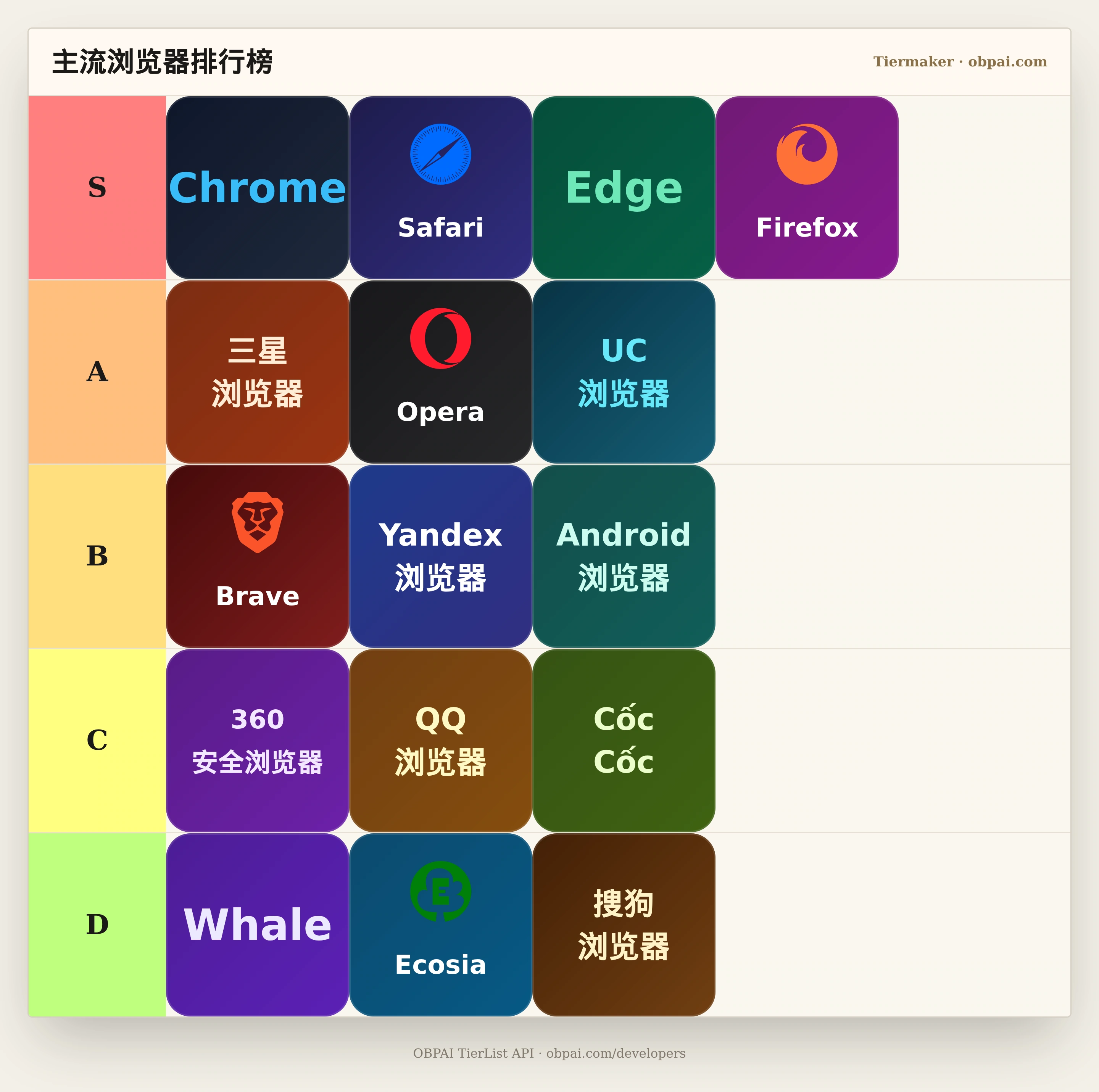
The above is the editorial opinion of the OBPAI geek team. The "Mainstream Web Browser Performance & Experience Tier List" template (ID 1785669101136) provides draggable tiles — drag them to build the browser ranking you think is right.
互动体验:拖拽排位《Web Browsers Tier List》
For embedding steps, see How to Embed the Interactive Tier Chart。
Web Browsers Tier List
想打造自己的个性化天梯图并开放给读者嵌入吗?